


Introduction
In 2026, care home compliance is being shaped by two realities: time pressure on every shift and the need to evidence standards quickly and consistently. Leaders are expected to demonstrate that policies are current, staff are trained, and safe practice is happening day to day, not just when an inspection is due. But in many care homes, the gap isn’t a lack of policies or training. It’s that staff can’t always find the right guidance fast enough, changes don’t reliably reach everyone, and “proof” ends up scattered across folders, spreadsheets, and inboxes.
That’s why choosing care home compliance software has become a strategic decision, not an admin upgrade. The right platform should do more than store documents, it should connect the full compliance chain in a way that works for busy, multidisciplinary teams.
In this guide, we’ll walk through what to look for in care home compliance software in 2026, with a practical checklist you can use to compare vendors. We’ll also explore how tools like Cloda, can help make it easier for staff to access, understand and embed the best practice policies and procedures you have invested, so safe practice is easier to deliver and easier to evidence.
Before we dive in, we would love to hear your thoughts below!
Poll: What matters most to you when choosing compliance software?
Cast your vote and see what matters to your peers!

Why care home compliance software is different in 2026
Care homes have always had to balance safe, person-centred care with strong governance. What’s changed in 2026 is the speed and complexity of the environment, evolving regulatory and inspection frameworks, and the expectations placed on services to show, clearly and consistently, that standards are being met.
Compliance is no longer a periodic exercise. It’s continuous. Policies are updated more frequently, guidance evolves, staffing models are more fluid, and frontline teams need to make the right decision quickly, often with limited time to “go look it up”. In that context, compliance software can’t simply be a digital filing cabinet or a training tracker. It has to support how work actually happens on shift.
Here are the biggest shifts shaping what “good” looks like now:
1. Evidence needs to be instant, not improvised
When a query comes in whether internally or during an inspection, leaders need to confidently demonstrate:
- the current approved policy
- who has read and acknowledged it
- what training and reinforcement sits behind it
- how understanding and safe practice are being assured
If evidence lives across folders, spreadsheets, emails, and paper sign-off sheets, the risk isn’t just admin stress, it’s inconsistency and exposure.
2. The “policy-to-practice gap” is the real risk
Most care homes don’t struggle because they lack policies. They struggle because:
- staff can’t find the right procedure fast enough
- updates don’t reliably reach every role, every shift, and every location
- training completion doesn’t always equal confidence or competence
In 2026, the winning systems are the ones that make the right action the easiest action.
3. Mobile-first is non-negotiable
Care is delivered away from desks. Software needs to work where care happens:
- quick, intuitive search on a phone
- clear, readable procedures (not endless PDFs)
- simple prompts and sign-offs that don’t interrupt care
4. AI tools are becoming the new frontline expectation
AI has moved from “nice-to-have” to everyday reality in many workplaces. Staff are increasingly familiar with asking questions in natural language and getting immediate answers. That expectation is now entering care settings too.
But in compliance, the key question is: answers based on what? Generic AI tools can be helpful for drafting or summarising, but they aren’t designed to guarantee that responses reflect your approved policies and procedures.
That’s why the safest, most useful approach is policy-grounded AI — a digital assistant that:
- answers questions using your approved policies and procedures as the source of truth
- helps staff find the exact step they need in the moment
- supports understanding with quick checks (especially for high-risk processes)
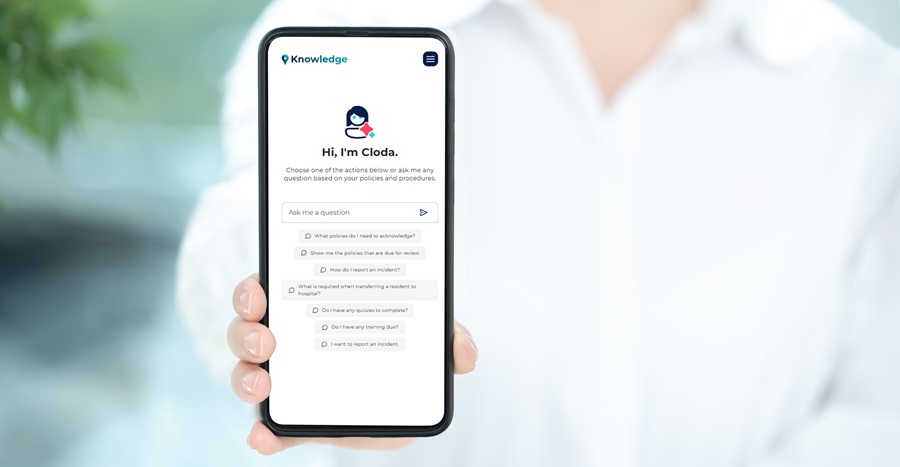
This is where Cloda fits naturally. Staff can simply ask Cloda a question, and she will instantly provide the answers they need directly from your current, approved policies and procedures. This ensures staff get consistent answers, and managers get stronger assurance that policy is understood and followed.
The 2026 Checklist: 12 things to look for in care home compliance software
Use this as a practical checklist when you’re comparing systems. The strongest platforms in 2026 don’t just store information — they help staff do the right thing at the point of care, and help managers prove it.
1) A true policy & procedure management system (not just a document repository)
Look for:
- A structured policy library (not just folders)
- Clear ownership, approval workflows, and review dates
- Version control so staff always access the current policy
- Ability to push updates and retire old versions
2) Fast, intuitive search that works like staff think
Look for:
- Intuitive search features that allow staff instant access to the information they need (e.g., “A resident has absconded, what should I do?”)
- Search functions that work in multiple languages, suitable for a diverse workforce.
- Filters/groups by category/service area.
- The ability to see policies relevant to your role.
3) A digital assistant that’s governed and policy-grounded
Look for AI that:
- Answers questions using your approved policies and procedures as the source of truth.
- Supports staff in their own language (where needed).
- References the policy and procedures it’s using (transparency builds trust).
- Supports staffs’ understanding of care procedures.
- Helps reduce “workarounds” and inconsistent advice.
(Cloda is designed for this moment: staff ask, Cloda answers in line with your policies — and supports understanding.)
4) Mobile-first access at the point of care
Look for:
- A clean, phone-friendly experience.
- Quick access without multiple logins or clicks.
- Designed for shift use (not just office admin).
5) Built-in governance controls and accountability
Look for:
- Assigned policy owners and approvers.
- Escalations for overdue reviews.
- Audit trails for changes and approvals.
- Clear role-based permissions.
6) Proof of policy understanding — not just a read acknowledgement
Look for:
- Short comprehension checks or quizzes for key policies.
- Evidence that staff understood the updated approach.
- Insights on where knowledge gaps are appearing.
(This is a natural area where Cloda supports teams: quick quizzes alongside policy guidance to reinforce learning.)
7) Centralised training management for mandatory and role-specific learning
Look for:
- One centralised system to manage all mandatory training plus role-specific requirements.
- A configurable training system by role/site, with automated mandatory training renewals.
- Ability to add your own training content (podcast or videos) into the training event.
- Ability to view personal training plan to take ownership of personal development.
- Clear oversight of training gaps (overdue, upcoming expiries, by role/unit/home) with simple reporting.
- Microlearning resources and short refreshers to reinforce high-risk topics between formal training sessions
8) Real-time dashboards for managers (assurance without chasing)
Look for:
- Overdue training, unread policies and procedures, expiring competencies
- Policy review schedules and compliance status
- Drill-down by home/unit/role
- Simple exportable reports for governance meetings and inspections
9) Audit-ready evidence in minutes
Look for:
- Clear evidence of policy access, updates acknowledged, and training compliance.
- Time-stamped logs.
- Easy reporting without manual collation.
- An “inspection mode” mindset: quick retrieval, clear structure, minimal scrambling.
10) Incident-to-improvement workflow (closing the loop)
Look for:
- A way to capture learning from incidents/near misses/complaints.
- Ability to update relevant policy content quickly.
- Automatic notifications to impacted staff.
- A method to confirm understanding after changes.
11) Usability and adoption (because unused software doesn’t reduce risk)
Look for:
- Evidence of strong user adoption and retention (e.g., active users, repeat usage, engagement by role).
- Minimal clicks to find guidance and complete actions.
- Clear prompts that guide staff quickly.
- Easy-to-navigate in-app user guides and short “how to” resources for new/agency staff.
- Single Sign-On (SSO) for quick, secure access (reduces login friction and boosts uptake).
- A genuinely mobile-first design that works smoothly.
12) Practical implementation, support, and UK readiness
Look for:
- A realistic rollout approach (not “set it and forget it”).
- Good support, training, and adoption resources.
- Clear data protection posture and security basics.
- A roadmap that matches how care is evolving.
Where Cloda fits: turning policies into answers, and answers into safer care
Even with the best care home compliance software, there’s a common gap between what’s documented and what happens on shift: staff need the right answer in the moment, not later in a policy folder or at the next scheduled training session.
That’s where Cloda adds practical value within your compliance system: it helps turn your policies and procedures into instant, easy-to-follow support at the point of care, while also strengthening your training approach. Staff can ask Cloda questions in plain language (and in their own language where needed), get answers grounded in your approved policies and procedures. Then, Cloda can reinforce learning through short comprehension checks, giving managers clearer evidence that key policies are not only accessible, but understood and applied consistently.
1) Real-time policy answers (built around your approved content)
Instead of searching through folders or scrolling long documents, staff can ask Cloda questions in natural language, such as:
- “What do I do if a resident refuses medication?”
- “When do I escalate a safeguarding concern?”
- “What are the steps after an unwitnessed fall?”
Cloda responds based on your approved policies and helps direct staff to the relevant procedure, supporting consistency across roles, shifts, and locations.
2) Own-language support for diverse teams
Over 32% of care staff in the UK are international trained. This diverse workforce brings immense value from broader perspectives, cultural competence, and enriched care experiences. Yet it also introduces new challenges, particularly when it comes to ensuring staff understanding of internal documentation such as care policies and procedures. Most of these essential documents are written in English, assuming a level of fluency that may not reflect the reality on the front lines. Cloda helps staff access guidance in their own language, reducing misunderstandings and supporting more consistent practice.
3) Comprehension checks that strengthen training and assurance
Cloda can reinforce key policies with short comprehension quizzes before policy acknowledgement, helping you move from “read acknowledgement” to “understanding demonstrated”.
This supports:
- safer practice for high-risk processes
- quicker identification of knowledge gaps
- stronger evidence that staff understood updates (not just received them)
- Serve as a form of corrective / preventative action post incidents.
4) Policy-based podcasts and microlearning
Cloda’s Training Room supports microlearning with short, engaging policy-based podcasts and videos—designed for onboarding and on-the-go refreshers. Cloda’s Custom Podcast Library can turn your approved policies and procedures into podcasts that you can review, edit, and approve before sharing, helping translate complex documents into accessible learning content.
5) Centralised training management (manage, assign, track mandatory requirements)
The Training Room is a full Training Management System that lets managers organise training in one centralised location, including the ability to schedule training events, assign learning content (like podcasts and videos), track renewals, monitor compliance, and provide staff with personalised training plans so they can view and manage what mandatory and role-specific training is assigned to them.
6) Compliance oversight at a glance: from insight to targeted action
For Quality and operational leaders, compliance oversight shouldn’t mean chasing spreadsheets or piecing together evidence across systems. With Cloda, you can ask the question you need answered and get the relevant compliance information quickly—across policies and training—for example: “Which policies are overdue for review?”, or “What mandatory training is outstanding by role or location?” Alongside this, you can also run reports and dashboards to identify knowledge gaps and use that insight to trigger targeted training interventions—such as assigning a focused training module, or resharing a policy with a quiz as a quick comprehension check to reinforce safer, more consistent practice.
Vendor questions to ask
Use these questions to assess whether a platform will actually support compliance in your care home.
Policies and procedures
- “Show me how a carer finds the correct procedure in under 10 seconds.”
- “How do you prevent staff accessing outdated versions?”
- “What’s your full policy governance workflow?”
- “Can we see policy access and acknowledgement by role, home, and shift?”
- “What happens when a policy changes—who gets notified, and how do we evidence understanding?”
Training and competency
- “Can we manage all mandatory and role-specific training in one place—including our own content?”
- “Can we automate renewals of mandatory training requirements?”
- “How do you give managers oversight of training gaps in real time?”
- “Can the system support microlearning between formal sessions?”
Evidence and audit readiness
- “If an inspector asks for evidence of compliance, how fast can we pull it together?”
- “Can you demonstrate your audit logs for policy changes and acknowledgements?”
- “Can we demonstrate who has completed mandatory training and what’s outstanding?”
AI and digital assistant capability (the 2026 differentiator)
- “Do you provide an AI assistant? If yes, what is it grounded in?”
- “Can staff ask questions in plain English (or their own language) and be shown the source policy section?”
- “Can the AI assistant reinforce learning with short comprehension checks?”
- “Can the AI assistant identify knowledge and compliance gaps?”
Practical rollout and adoption
- “How do you onboard agency/new staff and evidence they accessed key procedures?”
- “What does implementation look like in a real care home—time, support, and adoption?”
- “What is the user adoption and retention rate of your compliance system?”
Data protection and access control
- “What role-based permissions and audit trails are included as standard?”
- “Where is data hosted, and what security standards do you align to?”
Conclusion
Choosing care home compliance software in 2026 isn’t about ticking boxes, it’s about building a system that supports safer care every day and makes assurance straightforward when it matters most. The strongest platforms bring three things together: a controlled, up-to-date policy library, training and reinforcement that proves understanding (not just completion), and real-time evidence that reduces last-minute chasing and stress.
Just as importantly, the rise of AI is changing what staff expect. Teams increasingly want to ask a question and get a clear, consistent answer immediately—but in care, those answers must be governed and grounded in your approved policies and procedures. That’s why policy-aligned assistants like Cloda are becoming a practical part of modern compliance: helping staff access the right guidance in the moment, in their own language, and reinforcing learning with quick comprehension checks.
If you’re reviewing options this year, use the checklist in this guide to compare vendors and focus on what will make the biggest difference: policy-to-practice consistency, audit-ready evidence, and frontline usability.
Next step: If you’d like you can book a demo to see how Cloda supports policies, training and day-to-day compliance across your care teams. Contact info@cloda.ai.

Book a Demo (1)
"*" indicates required fields