


What is Care Home Audit Software?
Care home audit software is a system that automates the scheduling, recording, scoring and follow-up of internal audits, replacing manual checklists and spreadsheets with a single, traceable record of what was checked, what was found, and what happened next.
For CQC-registered providers, that traceability isn’t optional — it’s the substance of Regulation 17: Good Governance, the regulation most commonly breached in services rated Requires Improvement or Inadequate.
This article looks at what CQC actually requires from audit and governance systems, why so many providers are falling short of it, and what to look for in software built to close the gap.
Before we dive in, we would love to hear your thoughts below!
Poll: When your last audit flagged a quality improvement plan, was it resolved before the next audit cycle?
What Does the CQC Require From Care Home Audit Systems?
Under Regulation 17 of the Health and Social Care Act 2008 (Regulated Activities) Regulations, providers must have effective governance — including assurance and auditing systems — that assess, monitor and drive improvement in the quality and safety of care, and that assess, monitor and mitigate risk to people using the service.
The guidance is specific about what “effective” means in practice. Systems must let a provider identify where quality or safety is being compromised and respond without delay. Information feeding into audits must be up to date, accurate, and reviewed by people with the skills to understand what it shows. Where a risk is identified, providers must introduce measures to reduce it within a timescale that reflects its severity — and must continually evaluate whether their own governance and audit processes remain fit for purpose.
Although this does not describe a specific tool, it does describe a specific standard: audits that catch problems, escalate them, and demonstrably lead to action — not a checklist completed and filed.
Why Do Care Homes Need Audit Software Instead of Spreadsheets?
Because spreadsheets and paper checklists can’t close the loop between finding an issue and resolving it — and that gap is where most care home audit failures start.
In our review of 14 CQC care home assessment reports published in July 2026, all rated Requires Improvement or Inadequate, every single one had deficits in audit and quality assurance systems — despite most having a functioning audit schedule on paper. The recurring failure wasn’t an absence of audits. It was audits that missed what inspectors found on the day, compliance scores that didn’t reflect reality underneath them, and findings that were identified but never converted into a tracked, owned action. Read the full breakdown of those themes here.
That pattern maps directly onto where Regulation 17 sets its bar. The regulation doesn’t just ask providers to run audits — it asks them to prove those audits are fit for purpose, reviewed by people who understand their significance, and acted on without delay. A spreadsheet or paper-based audit can tick the first box. It struggles to evidence the rest.
What Features Should Care Home Audit Software Include?
To meet Regulation 17 in substance rather than just on paper, care home audit software should include:
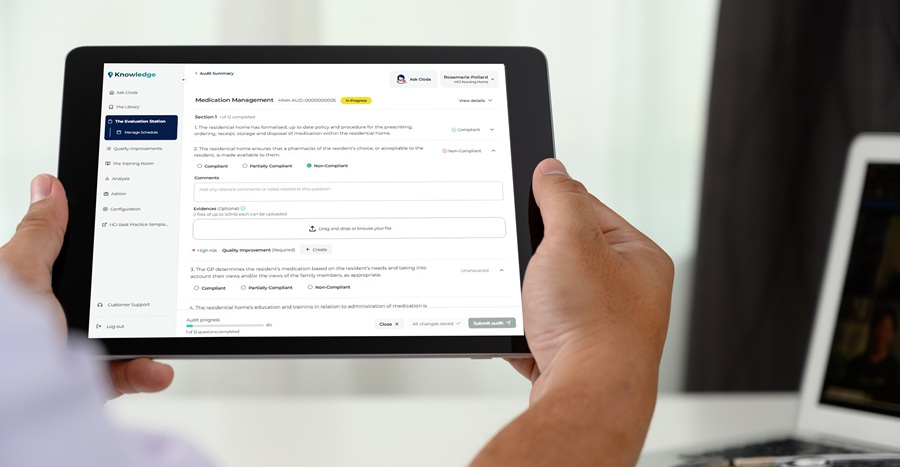
- Owned, deadlined corrective actions — every finding generates a Quality Improvement Plan (QIP) with a named owner and a due date, not just a note on a report.
- Evidence-linked scoring — audit scoring should include links to evidence of findings.
- Automatic notification of QIPs — when a QIP is raised, the owner is automatically notified.
- Verification, not just completion — the audit can’t be marked “closed” without evidence the QIP was actually resolved.
- Real-time, service-level visibility — registered managers can see their own service’s audit and QIP status independently of group-level reporting.
- Audit trail for regulator requests — a ready, exportable record for when CQC asks for a written report under Regulation 17(3).
How Does Care Home Audit Software Support Closed-Loop Governance?
Closed-loop tracking means every audit finding has a documented path from identification to verified resolution — and that path is visible at any point, to anyone who needs to see it.
This is the direct answer to the “continually evaluate and improve” requirement in Regulation 17(2)(f). A provider can’t demonstrate their governance systems remain effective if findings disappear into a spreadsheet the moment they’re logged. Closed-loop systems keep the finding open, visible, and owned until it’s genuinely resolved — which is the difference between an audit that produces a score and one that produces an improvement.
What’s the Difference Between Care Home Audit Software and a Full Quality Management System?
Care home audit software manages one function — scheduling, scoring, and tracking audits. A Quality Management System (QMS) covers the wider set of Regulation 17 requirements: policy management, incident recording, staff training records, complaints, feedback, and document control, alongside audit.
Audit software on its own can meet 17(2)(a) and (b) — assessing and mitigating risk. A full QMS is what supports the rest of the regulation: secure record-keeping under 17(2)(c) and (d), feedback loops under 17(2)(e), and the ongoing evaluation of governance itself under 17(2)(f). For providers running audit and everything else in separate systems, the gap between them is often where oversight breaks down.
Conclusion
Regulation 17 doesn’t ask providers to run audits for their own sake — it asks them to prove those audits catch real risk, get reviewed by people who understand what they’re looking at, and lead to action without delay. That’s a higher bar than most manual systems can consistently clear, and it’s the exact bar recent CQC reports show services falling short of, even where an audit schedule was technically in place.
Care home audit software closes that gap by design. Choosing the right one isn’t about ticking a box marked “audit system” — it’s about whether findings are actually tracked to resolution, whether evidence backs up the score, and whether a registered manager can see their own service’s real-time position rather than waiting on a group-level report. Get that right, and audit software stops being a compliance formality and starts being the tool that catches problems before an inspector does.
Where Cloda’s Evaluation Station Fits In
The Evaluation Station was built to close the exact gap Regulation 17 describes and our own review of recent CQC reports keeps surfacing.
With the Evaluation Station you can:
- Easily generates a Quality Improvement Plan (QIP) item when you identify a compliance gap, with a named owner, a deadline, and a status that stays visible until it’s resolved and verified.
- Audit evidence is linked directly to underlying records in real time, so a compliance score reflects what’s actually been reviewed, not just that a form was filled in.
- Oversight sits in one system across every home in a group, giving registered managers the same visibility at service level that group-level leaders have centrally.
- Nothing sits unassigned or falls off a spreadsheet, because ownership is built into the workflow rather than left to informal understanding.
Want to see how The Evaluation Station could close the audit-to-action gap in your care home? Get in touch with the Cloda team.
Book a Demo
For more information or to book a demo of The Evaluation Station, contact info@cloda.ai.

Book a Demo (1)
"*" indicates required fields