




Introduction
An internal audit is supposed to catch a gap before the regulator does. So when a provider’s own audit reports full compliance in an area, and inspectors then find otherwise, it raises an uncomfortable question — not about whether the standard was being met, but about whether the internal process meant to check that is actually working.
This disconnect between audit results and inspection findings turns up repeatedly in CQC reports, and it isn’t usually down to a badly designed audit tool. Often the audit finds the gap correctly, and the finding simply has nowhere to go from there. Understanding why that drift happens, and what closes it, is central to genuine CQC readiness, not just passing an internal check.
Before we dive in, we would love to hear your thoughts below!
Poll: When your last audit flagged a quality improvement plan, was it resolved before the next audit cycle?
What’s the difference between an internal audit and a regulatory inspection?
An internal audit is a self-assessment your own organisation carries out; a regulatory inspection is an external, independent assessment carried out by a body like CQC or Ofsted.
The two are meant to reach the same conclusion — but in practice, they often don’t. An internal audit exists so that your organisation finds and addresses its own gaps before a regulator does. When internal audit results and inspection ratings tell two different stories, it means the internal process isn’t doing the job it’s there for, and that gap is exactly what strong internal audit software is designed to close.
Why do internal audit results sometimes not align with inspection findings?
Internal audit results don’t align with inspection ratings when audits identify a gap but the corrective action never actually happens.
This isn’t usually a case of a badly designed audit tool. It’s often the case of the audit finding a gap correctly, and then that finding not being managed or tracked correctly. Without a system tracking the finding through to a completed action, the audit and the operational reality quietly drift apart and the inspection is what exposes the drift.
Why does internal audit matter for CQC readiness specifically?
Internal audit matters for CQC readiness because the regulator assesses not just whether standards are being met, but whether the organisation has a functioning system for identifying and correcting its own gaps.
An inspection isn’t only checking current compliance, it’s checking whether your internal audit process is actually working as a safeguard.
That means a weak or informal internal audit process is a regulatory risk in itself, independent of whatever it happens to find. A provider with robust internal audit and a documented, closed-out finding is in a fundamentally stronger position at inspection than a provider with no findings at all, if that absence of findings can’t be evidenced with a genuine audit trail.
What should internal audit software actually do?
Internal audit software should do three things: schedule and structure audits consistently, capture findings with evidence, and critically, track every finding through to a resolved, evidenced action.
A spreadsheet or basic checklist app can schedule an audit and record a compliance rating well enough. What it can’t do is guarantee that a “Requires Improvement” or “Inadequate” rating automatically becomes an owned task with a deadline, or that the audit record stays open until that task is actually complete.
That third piece — the follow-through — is what separates internal audit software that produces a paper trail from internal audit software that produces genuine inspection readiness.
What does strong internal audit software look like in practice?
In practice, strong internal audit software has four characteristics:
- Structured scheduling — audits assigned by category, location, auditor, and owner, so nothing depends on informal reminders.
- Evidence captured at the point of assessment — comments and supporting evidence attached to each finding as it’s made, not reconstructed afterward.
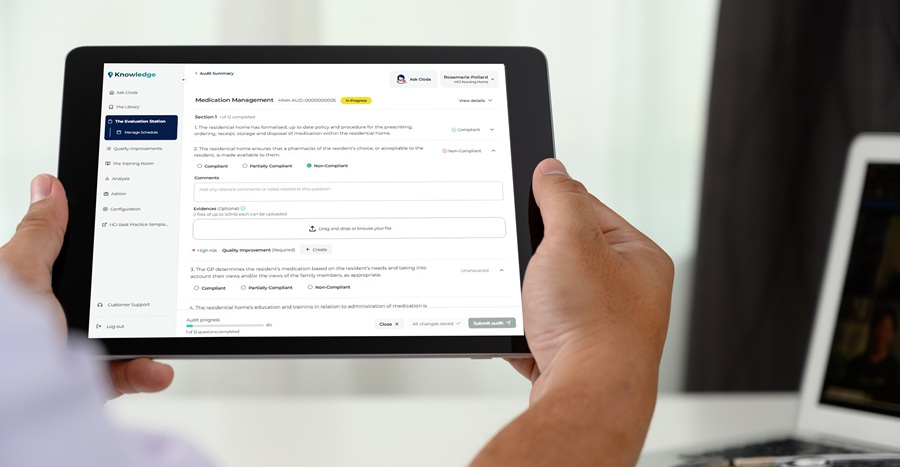
- Easily generate QIPs with when findings are identified — a partially or non-compliant rating should allow the user to easily generate an owned, risk-rated, deadline-driven QIP action, not just sit as a note.
- A closed-loop audit trail — the audit itself should remain open until every action it generated is genuinely resolved, so the audit record and operational reality can’t diverge.
Without the last two, an organisation can have a perfectly functional-looking internal audit process on paper while still walking into the exact disparity CQC inspections are designed to catch.
How can you tell if your internal audit process would hold up at inspection?
You can test this by picking any recent audit with a quality improvement finding and asking: can you show, right now, who owned the resulting action, what the deadline was, and whether it was completed on time?
If that answer requires searching through email threads or asking around, the audit trail an inspector would look for doesn’t really exist yet even if the original audit was completed properly.
How does the Evaluation Station support internal audit for CQC readiness?
The Evaluation Station supports internal audit readiness by closing the gap that causes internal audit and inspection ratings to disagree.
Every audit finding rated partially or not-compliant allows you to raise a Quality Improvement with a named owner, a risk rating, and a due date. The related audit stays open until every linked Quality Improvement is genuinely resolved so the audit record can never say “compliant” while the underlying issue is still outstanding.
For quality and compliance teams preparing for a CQC inspection, that means the internal audit trail isn’t just documentation of what was checked, it’s evidence that findings were owned, tracked, and closed, which is precisely what inspectors are assessing when they look at how an organisation manages its own compliance.
Book a Demo
For more information or to book a demo of The Evaluation Station, contact info@cloda.ai.

Book a Demo (1)
"*" indicates required fields